Blog

How Accounting Firms Can Use MCP to Query Practice Management Data

Realization dipped, unbilled work is piling up, and one large client is more than 90 days behind. Here is how to move from the number to the explanation with Qount’s MCP Connector.

Every partner has had this moment. A report shows a figure that looks off, and the next thought is a question: why? Why did realization slip on business tax work? Why does one client account for most of our aged balances? Why does the deadline report look healthy when the team feels stretched?

The report tells you what happened, but the explanation usually takes longer. Someone pulls a second report, then a third, and then lines the results up side by side to see what they say together.

Our earlier post on MCP introduced Qount’s MCP Connector, which connects your Qount practice management data to a compatible AI assistant so you can ask questions about your accounting firm in plain English. 

This guide is the hands-on follow-up. It shows how to use MCP to query your accounting firm’s practice management data through five questions a partner or operations leader might ask, what a good answer looks like, and the follow-up question that takes the analysis one step further. The five examples use fictional client names, people, and figures. After them, you will see how a real accounting firm put the same approach to work.

How a conversation with your data works

With Qount’s MCP Connector, you describe the business question in plain English, and your connected AI assistant finds the relevant Qount data and organizes the results. You don’t need to know which report to open first.

You also don’t need to get the question perfect on the first try. A simple question gets you a first answer, and that answer usually raises the next question. Start with “How much time did each employee log?” and you get a list of hours. Then ask “Show each employee’s total by client, keep administrative time separate, and break it out by type of work only when I ask,” and the same data is organized around how your accounting firm works.

That is one illustration, and the order of your questions is up to you. The five examples below show the same back-and-forth on questions partners ask all the time: which overdue balances to chase first, where unbilled work is waiting, which services deserve a pricing review, whether the team is ready for a deadline, and whether the workload is spread the way you think it is. Each example has three parts: the question you ask, what comes back, and a natural next question that takes you one level deeper. The figures are fictional, and the questions are ones you could ask your own data.

1. Which overdue balances deserve a call first?

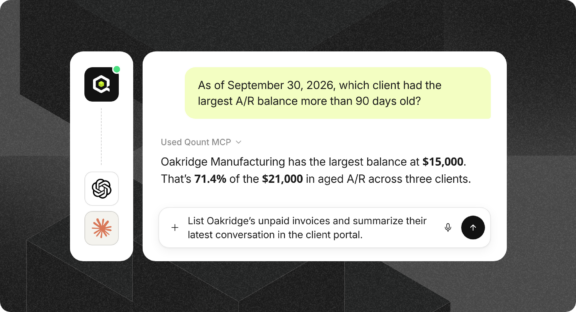
Ask: “As of 09/30/2026, rank clients by A/R more than 90 days old and show their total A/R. Then show supporting invoices for the top client.”

What comes back: In this fictional example, three clients carry a combined $21,000 that is more than 90 days old. Oakridge Manufacturing accounts for $15,000 of it, or 71.4%, which makes it the first account to review.

Ask next: “List Oakridge’s outstanding invoices and summarize its latest conversation in the client portal before I follow up.” The invoices and the most recent client conversation now arrive together, ready for the call.

An aging balance shows where to look. The invoice history and the client conversation help explain what is behind it.
 

qount-which-overdue-balances-deserve-a-call-first

2. Where is unbilled work waiting?


Ask: “As of 09/30/2026, show clients with work in progress older than 60 days. Rank by aged amount and distinguish WIP from outstanding invoices.”

What comes back: Oakridge leads again, with $7,000 of the $10,000 in WIP older than 60 days (70%). The answer keeps WIP separate from receivables.

Ask next: “Show open tasks for Oakridge alongside its invoices and identify questions for the billing manager.”

Aged WIP can mean the work is ready to bill, still waiting on completion, or governed by a billing arrangement. The data gives your billing manager a better starting point for finding out which.

3. Which engagements deserve a pricing review?

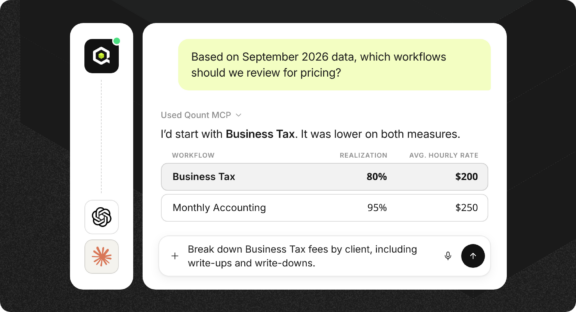
Ask: “For September 2026, identify workflows with low realization or low average hourly rate. Show the source realization and AHR values and recommend where a manager should investigate.”

What comes back: Two types of work (workflows in Qount), side by side:

  • Business Tax: $30,000 billable, $24,000 billed, 120 hours, 80% realization, $200 AHR
  • Monthly Accounting: $25,000 billable, $23,750 billed, 95 hours, 95% realization, $250 AHR

Business Tax trails on both measures, billing 80% of the value of the work recorded at an average of $200 per hour, compared with 95% and $250 for Monthly Accounting. Before anyone considers a fee increase, a manager can review scope, pricing, write-downs, and time coding to see what is driving the gap, since a low figure shows where to look and the cause takes a closer review. 

Ask next: “Show the client-level fee review, including write-ups and write-downs, for the same dates.”


qount-which-engagements-deserve-a-pricing-review

4. Are we ready for the deadline?

Ask: “For Business Tax tasks due 10/01/2026 to 10/15/2026, show completed, started, and not-started counts. List unfinished tasks for review.”

What comes back: Of 100 tasks due in that window, 60 are completed (60%), 25 are started (25%), and 15 are not started (15%). That leaves 40 tasks unfinished.

Ask next: “List the unfinished tasks by due date with available assignee names, and show which have the earliest deadlines.” The status count becomes a list of clients, owners, and dates.

One detail worth knowing: “started” is a status category, and it doesn’t mean a task is blocked. This view also shows what is due in the period, which is different from what finished during it.

5. Is the workload spread the way we think it is?

Ask: “For 10/05/2026 to 10/11/2026, show the Tax department’s capacity and allocated hours by user. Flag allocations above capacity.”

What comes back: The department has 80 hours of capacity and 76 hours of work scheduled against it, or 95%, which looks manageable. Underneath that total, Alex Morgan is allocated 46 of 40 available hours (115%) while Jamie Lee is allocated 30 of 40 (75%).

Ask next: “Show Alex’s assigned tasks and due dates so the manager can assess possible transfers.”

A department total can look comfortable while one person carries too much. Whether work can move depends on skills and deadlines, which is a judgment for the manager.

How one accounting firm put this into practice

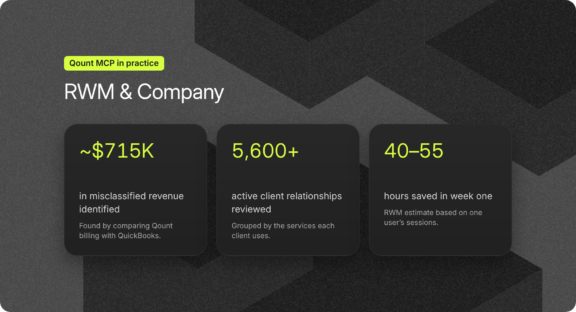
The five examples above use fictional data. The next one comes from a real accounting firm. RWM & Company, a 40-person CPA and advisory firm in central Pennsylvania, connected Qount to an AI assistant, and its president, Robert W. Morris III, CPA, spent a week putting the connection to work. RWM & Company’s case study tells the full story, and three moments from it map closely to the questions above.

Starting with the whole client base. In plain-English conversations, RWM reviewed more than 5,600 active client relationships and grouped them by the services each one uses. That made it easy to answer questions like which tax clients are not using the firm’s other services, and it produced clean, deduplicated contact lists for the email campaigns the firm had wanted to run for years.

Following a number to its cause. Working with the Qount connector and a separate QuickBooks connector, the assistant compared 15 months of Qount billing by type of work with the firm’s QuickBooks profit and loss statement. It found that bundled invoices issued on the first of each month had been recorded as accounting revenue, which left roughly $715,000 of payroll and tax revenue in the wrong accounts. Robert reviewed the supporting workbook and approved the correcting entries in writing before anything was posted, and total income did not change.

Turning a cleanup into a routine. After reconciling accounts receivable between Qount and QuickBooks to the penny, RWM saved the procedure and set it up as a scheduled task that runs on the 25th of each month. A person only reviews the exceptions it flags.

RWM estimates that one user’s first week of sessions saved 40 to 55 hours of staff and management time, and that the routines created represent 250 to 350 hours of recurring capacity a year. Those hour figures are the firm’s own estimates. The dollar amounts and record counts are measured.

Robert’s rule of thumb for his team is worth borrowing: treat the AI like a sharp staff accountant with instant access to every system, give it a clear ask, and keep every judgment call and every approval for yourself.


qount-mcp-in-practice-rwm-and-company

Three habits that make every answer better

Be specific about the basics. Name the period, the clients or staff to include, the measure, and the grouping, then add any rules and thresholds. A simple template: “For [period], show [measure] by [grouping] for [clients or staff]. Flag [threshold]. Start with totals and give detail only when I ask. Tell me which reports you used, which dates the analysis is based on (invoice date or work date, for example), and whether the results are complete.”

Ask for the evidence. If a total raises a question, say “Show me the records behind that total.” Some views are summaries, and the supporting detail sits in individual records. RWM held itself to the same standard: every number in its case study traces to a report pull or a formula in an Excel workbook that staff can reuse without AI.

Check what the words mean. A report of revenue by partner shows the invoiced revenue of the clients assigned to each partner, which does not mean the partner personally performed the work. In one fictional example, $10,000 of revenue sat under “Unassigned,” a useful reminder that this kind of analysis can also reveal gaps in how client teams are set up.

More questions to try

  • Leadership briefing: “Summarize last month’s revenue, collections, A/R, WIP, and delivery exceptions. Say which dates each figure is based on.”
  • Client meeting preparation: “For Riverbend, summarize profile, outstanding invoices, open work, and the latest conversations in the client portal.”
  • Client team setup: “List active clients missing an assigned Account Manager.”
  • Service line review: “Compare invoiced revenue and logged hours by type of work for Q3. Show the two measures separately.”
  • Client segments: “Show revenue for clients tagged Advisory and list every client in that segment.”
  • Pricing check: “Which clients have fees that look inconsistent with the services they receive?”
  • Client manager review: “For each client manager, summarize the revenue, services, and outstanding work in their book of clients.”

What getting started looks like

Once your accounting firm’s MCP connection is enabled in a compatible AI application, three steps help your team build confidence in the results: 

  1. Ask “What report categories and data are available to my connection?”
  2. Compare one known time total, one revenue total, and one as-of A/R balance with the matching Qount reports, using identical dates.
  3. Save a small set of reusable prompts for leadership, operations, billing, and delivery.

What the assistant can see depends on how your connection is set up and on each person’s user access, so everyone works only with the data they are permitted to view.

The first number is rarely a partner’s last question. With the MCP Connector, the next question is one sentence away, and each answer arrives with the reports and dates behind it, so your team can spend its time on the judgment calls that only your accounting firm can make.

Qount customers can contact their Qount representative to set up the MCP Connector or ask about report definitions. If you are evaluating Qount, reach out to our team to see how the connector works with your accounting firm’s data.

Newsletter

Subscribe to Qount’s Monthly Brief

Be the first to learn about AI advancements for tax and accounting, as well as Qount product updates, industry insights, and accounting memes.

Frame 2609528

One Platform. Total Visibility.

Unlock capacity you didn’t know you had

Build greater momentum with every action. Automate hand-offs. Sharpen your insights. Reclaim time. Qount multiplies the impact of everything you do—so you can go beyond tax and accounting firm practice management.