Practice management that makes it easy for clients to do their part.
A client portal, native mobile apps and secure links that give every client one clear list of what to do next, across every entity they are authorized to access, with the conversation attached. Clients act in a tap. Your firm stops chasing.
More clarity for clients. Less chasing for your team.
No more “what do you need from me?” emails. When a client opens Qount, they see an organized view of what needs their attention across the entities they are authorized to access, with a clear action for each item. They finish faster. You chase less.
Start with your welcome. New clients land on a message from your firm, with your starter guide and videos a tap away, and it stays one tap away after that.
One list, every entity. A client with a business, a holding company and a personal return sees all three together, each item tagged. No separate logins.
One tap to the task. Sign, pay, upload, answer or review straight from the item.
See what needs action. Counts show what needs action today. Finished items move to their own section, ready when the bank asks for last year’s return.
Show only what matters to clients. You choose which sections each client sees, so a bookkeeping client never wades through tax tabs.
Reminders do the chasing. Automated reminders nudge clients on anything still open, so your staff don’t have to.
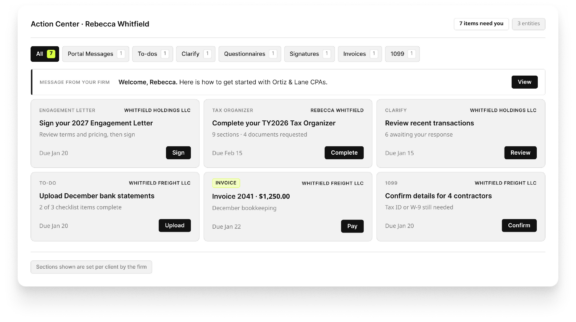
How this is different: Qount brings outstanding tax, accounting, document and billing actions into one client view across authorized entities, so clients can see what needs attention without checking each section separately.
Qount Advantage
Give clients a mobile app that they actually want to use
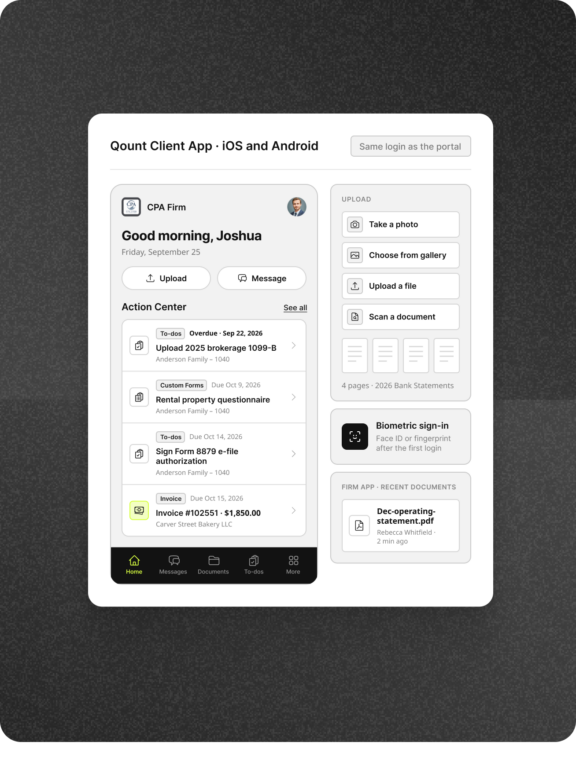
Most client tasks get done in the gaps of a day: a receipt photographed in the car, an invoice paid at lunch, a letter signed from the couch. Qount’s native iOS and Android apps make those moments count, on a phone or a tablet, and your team sees the result the moment it happens.
- The same Action Center, in their pocket. One login for web and app, and whatever a client does on the go is already there on the web.
- Paper becomes a PDF in a few taps. Photograph it, choose it from the gallery, or scan several pages at once. Review every page, then drop it into the folder your firm requested.
- Face ID or fingerprint, no password to remember. Multi-factor authentication is available when your firm requires it.
- Tax season fits on a phone. Engagement letters, organizers, and return delivery open inside the app with no second sign-in.
- Your team is mobile too. The firm app shows a client’s upload the moment it lands and lets staff answer messages from anywhere.
How this is different: Clients can capture documents, respond to requests, pay invoices and complete guided steps from Qount’s native mobile apps, with their activity connected to your firm’s work.
Qount Advantage
Keep every conversation tied to the work
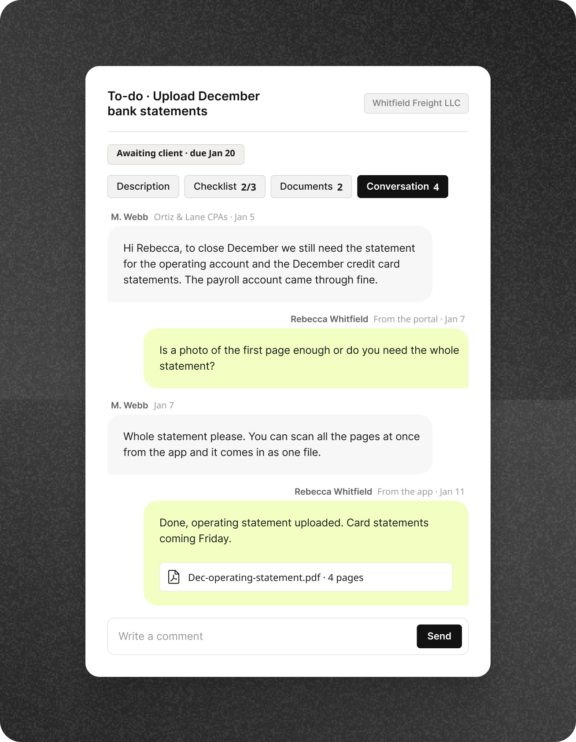
Every To-do, questionnaire, return delivery, invoice, transaction and vendor request can carry its own conversation. A client with a question asks it right where it came up, and the answer stays with the work your team is completing. Nobody digs through email to work out what a reply was about.
- A thread on every request. Clients reply from the To-do, the transaction, the invoice, or the organizer. The answer lands where the work is, and your team sees it right away.
- Respond on the go. Clients reach your firm from the portal, the app, by email, or by text, and the message lands on their client record for your team.
- Portal Messages organized by entity. Complete threads with replies, attachments, and read tracking are grouped by the business or individual they concern.
- Keep the full history. Completed items retain their conversation, so anyone on your team can see what was asked and answered months later.
How this is different: Client attributes should drive action, not sit in fields. Qount turns the information your firm records into saved views, defined client audiences and communications that reach the right clients.
Qount Advantage
Let clients act without logging in
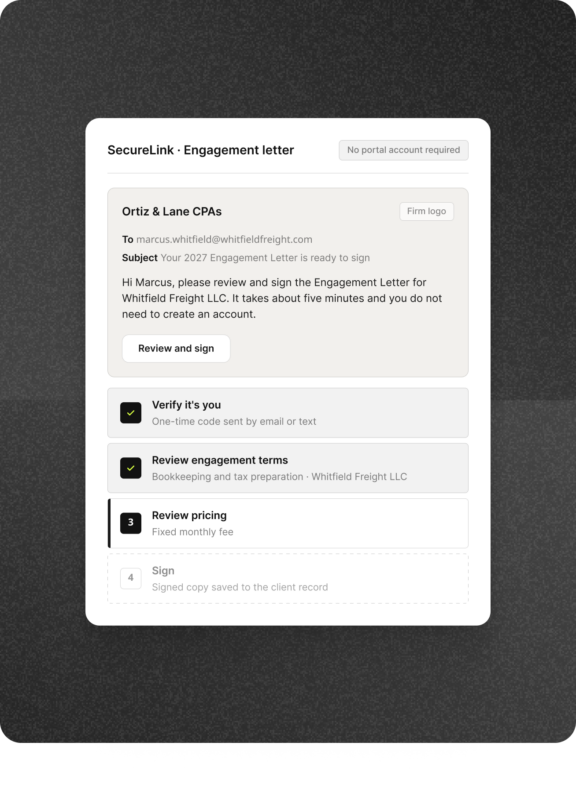
We know some clients will never set up a portal account, and a new client does not have one yet. Passwordless SecureLink access takes them from your email straight to the task: upload the document, pay the invoice, finish the organizer, review and sign. Done in minutes, and recorded in Qount as if they had logged in.
- No account, password, or app required. The link opens on the task itself, so clients get it done instead of asking how to log in.
- Win the client before the portal exists. Send a prospect their engagement letter by SecureLink. The signed copy is on their record the day they become a client.
- Protected at every step. A one-time code sent by email or text opens the link, with knowledge-based identity verification before an e-file authorization is signed.
- Familiar every time. SecureLink uses the same guided screens as the portal and the app, so clients always know where they are and what comes next.
- Nothing falls outside Qount. Documents, answers, payments, and signatures from a link attach to the client and the work exactly as they would from the portal.
How this is different: SecureLink combines the ease of responding from an email with the record-keeping of the portal. Clients can complete the task without a portal login, while your team keeps the response connected to the work.
Qount Advantage
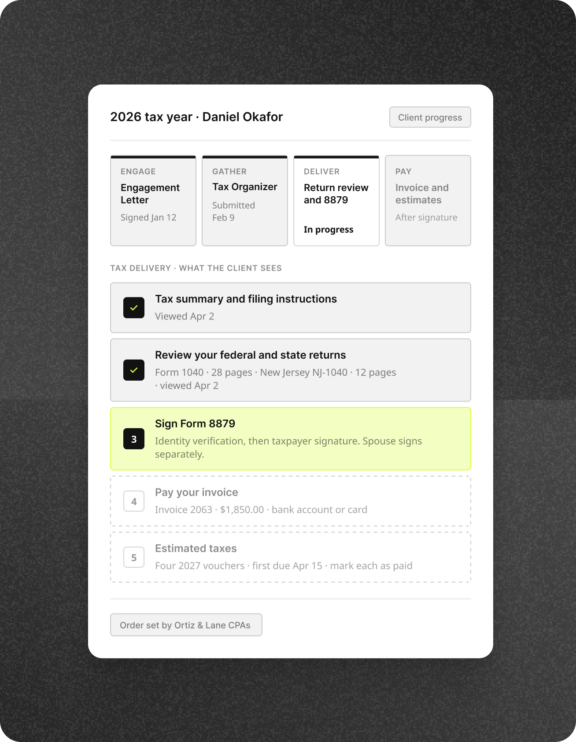
Guide clients from engagement letter to signed return
Tax season has a lot of steps, and most of the follow-up a firm does is explaining the next one. Qount walks each client from the engagement letter to the signed return in the order you set, one clear step at a time, and clears each one from the Action Center as it is done. Fewer “what happens now?” calls and faster signatures. Your firm controls the sequence and can require payment before final release.
- Agree on the work in minutes. Clients review terms, pricing, and signatures in one guided flow. When you allow suggested edits, they can raise changes for your team to review before signing.
- Organizers clients actually finish. Gather uses prior-year information to prefill responses where available, guides clients to the next required question, and shows which documents are still missing.
- Deliver in the order you choose. TaxLinQ walks clients through the tax summary, filing instructions, return review, e-file authorization, and payment in the sequence you set.
- Estimated taxes tracked, not forgotten. Vouchers arrive with the return. Clients mark each estimate paid with the amount and date, and your firm sees it without asking.
How this is different: Qount connects engagement letters, organizers, return delivery and payment in one client experience, with your firm controlling the delivery sequence.
Qount Advantage
Keep year-round client work moving
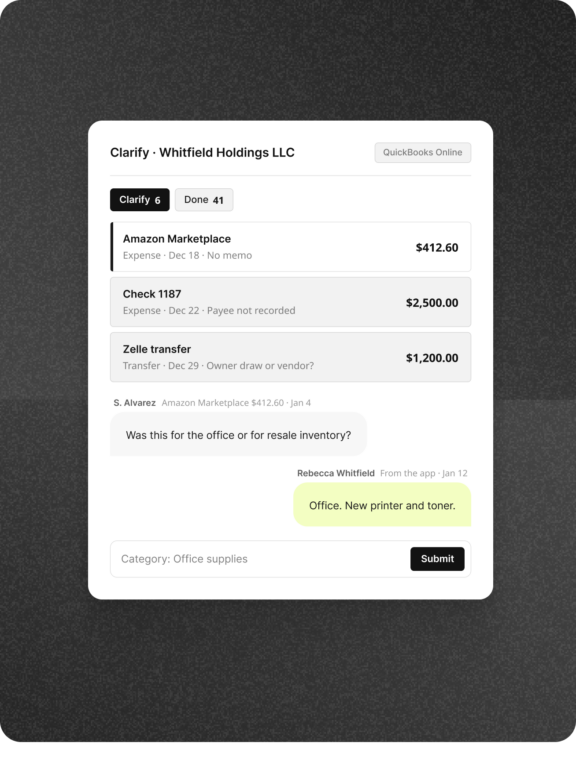
Bookkeeping clients get asked things all year: what was this charge, who is this vendor, where is the W-9. Qount puts those questions in the same client experience as everything else, so clients answer them from wherever they are and your team stops reconciling email threads.
- Clarify transactions at the source. Uncategorized transactions come straight from QuickBooks Online or Xero. The client answers each one in the portal or app, and the books get the answer.
- 1099 vendor details without the chase. Clients see which vendors are missing a tax ID or W-9, fill in the gaps, and upload the form, so January is not a scramble.
- Monthly requests, same simple list. Bank statements, receipts, and open questions arrive as To-dos with checklists, so a bookkeeping client always knows what the month still needs.
- Year-end has nothing to reconstruct. Every answer, W-9, and statement is filed to the client record as it arrives, so the books and the 1099s are ready when January comes.
How this is different: Qount brings bookkeeping questions and 1099 requests into the same client experience as tax work, giving clients one familiar place to respond.
One experience for the client. One record for the firm.
However a client responds, nothing lands in a side channel. Uploads, answers, signatures and payments flow to the client record, the engagement and the billing they belong to, so your team always sees the same picture the client does.
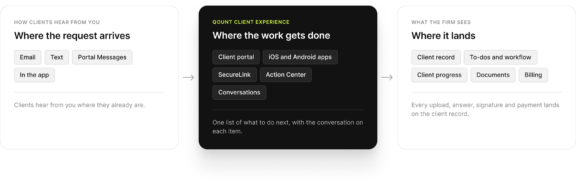
The client-facing tools your firm needs, all working together
Portal access, mobile apps, secure links, messaging, requests, signatures, payments and client accounting tasks work together in Qount, with multi-factor authentication, biometric sign-in and SOC 2 Type II controls.
-
-
Action Center across entities
-
Native mobile apps
-
SecureLink
-
To-dos, checklists and reminders
-
Conversations and Portal Messages
-
Documents and mobile capture
-
Questionnaires, custom forms and Gather
-
Engagement letters and e-signatures
-
Guided tax delivery with TaxLinQ
-
Invoices, payments and estimated taxes
-
Clarify and 1099 collection
Practice Management that delights your clients
See how accounting firms use Qount to stop chasing clients, and start getting things done faster.







One Platform. Total Visibility.
Get a Demo of Qount Practice Management
Whether you are replacing legacy practice management software or consolidating multiple tools into one system, Qount provides the structure and intelligence modern firms require.